 Roy Pun
Notion AI credits 怎樣計算?Standard、Select 額度夠用多少次
Notion AI credits 改制後,我手動選 Opus 5.5 做一次工作,就用了約 70 credits。用每月 500 Select credits 計算,同類工作大約只能做 7 次。
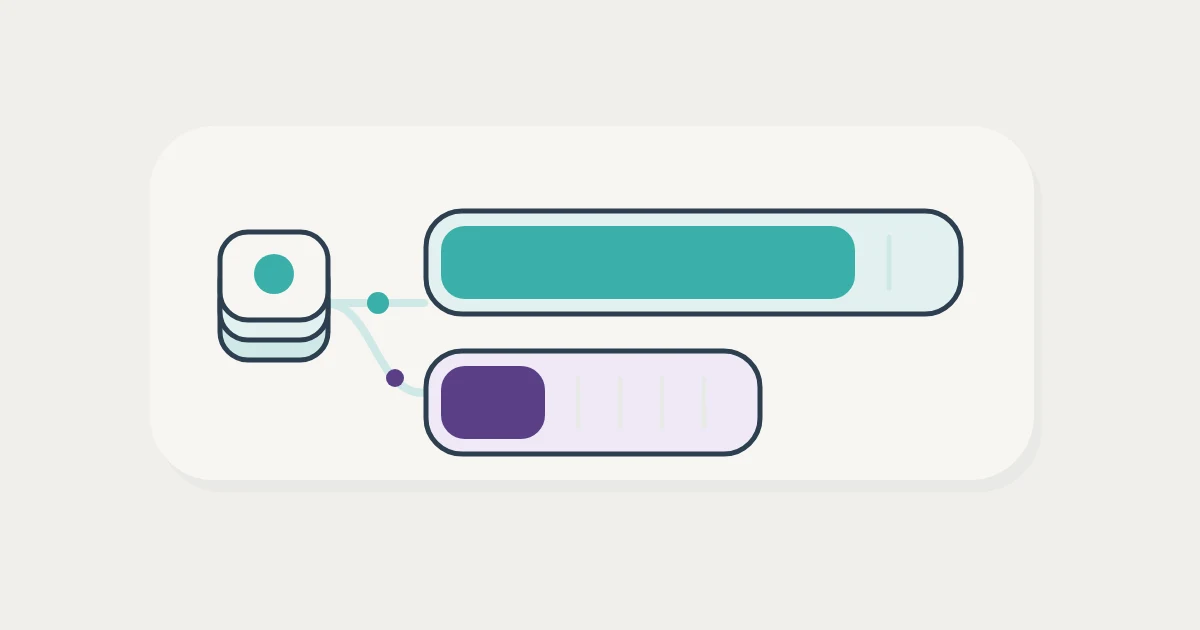
如果你已經習慣每次選最強的 model,這次改動會很直接:同樣在 Notion 裏工作,用 Auto 和自己選 model,扣的是兩份獨立額度,消耗速度也相差很遠。
以我的使用體驗,新用量模式確實是一次降級。要決定 Business 是否值得保留,我會先看每月常做的工作能完成多少次,再看哪些工作可以交給已經付費的其他 AI。
Notion AI 這次更新了甚麼?
這次 Notion AI 更新同時改了 Agent 能力、Auto 選 model 的方式,以及用量計法。新制度在 2026 年 10 月 19 日向新客戶推出,現有客戶於 11 月 2 日轉用。官方更新說明
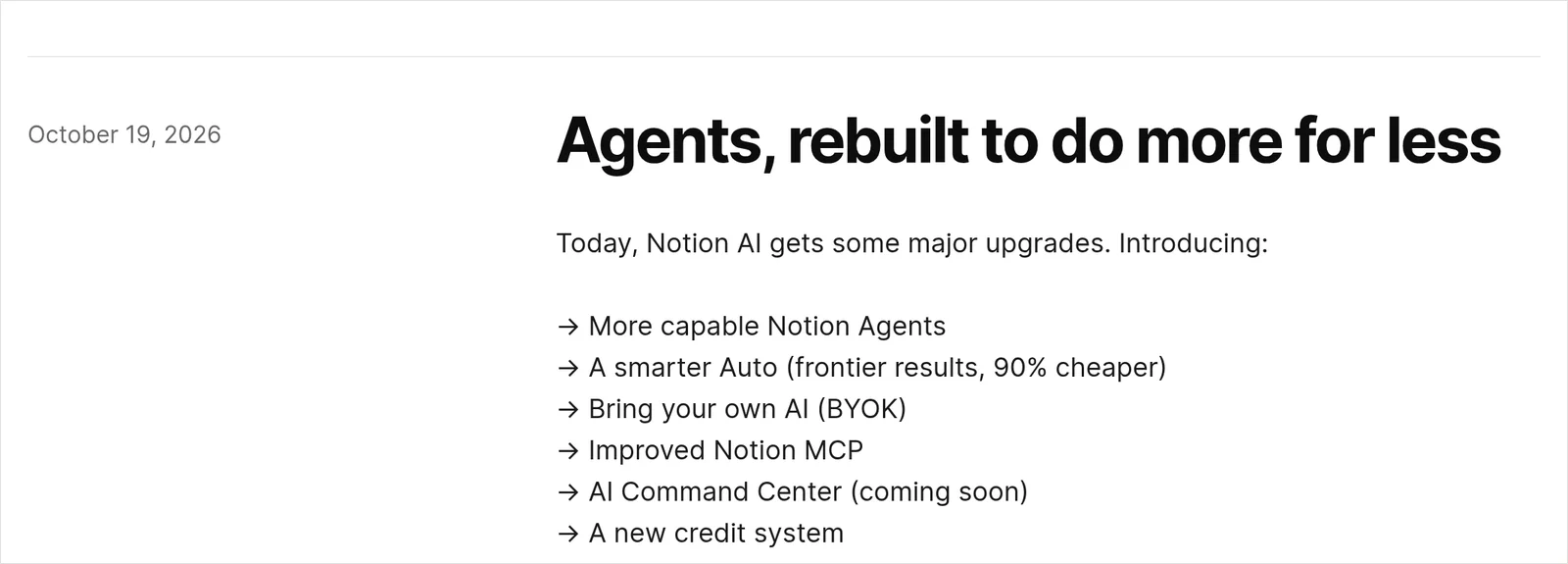 來源:Notion Releases,2026 年 11 月 13 日截圖。
Notion 公布的主要變化包括:
- Auto 升級:由系統選擇 model。Notion 表示,在超過 20 種常見用途的測試中,結果與 Opus 5.5、Astra 相近,平均成本低約 90%。
- Agent 重建:任務運行時間由五分鐘延長至超過 24 小時,加入電腦和瀏覽器操作、較好的工作資料管理,以及「Review for me」模式。Notion 表示,網頁和手機端 Agent 最多快 50%,Custom Agent 在其測試中的運行成本低約 30%。
- 接入其他 AI 用量:可連接自己的 ChatGPT plan;Enterprise 的 BYOK 處於 private alpha。
- Notion MCP 更新:memory sync 已推出,透過 MCP 使用 Skills 則列為 coming soon。
- AI Command Center 尚待推出:官方預告可查看成員、功能及 agent 的用量,管理開支上限、model 選擇,以及誰可建立、暫停或封存 Custom Agent。
以上能力與推出狀態來自 Notion 10 月 19 日公告。我理解公司團隊會重視集中管理的方向;以個人用家的角度,我更在意它能否完成手上的工作,以及每次會用掉多少額度。
Notion AI credits 新制度怎樣運作?
先分清楚三種 credits:Standard 和 Select 屬於每名成員的月度額度,Notion credits 則是 workspace 共用的額外用量。每人的實際包含額度可因 plan 或購買安排而不同,可在 Settings → Notion AI → Me 查看。官方說明
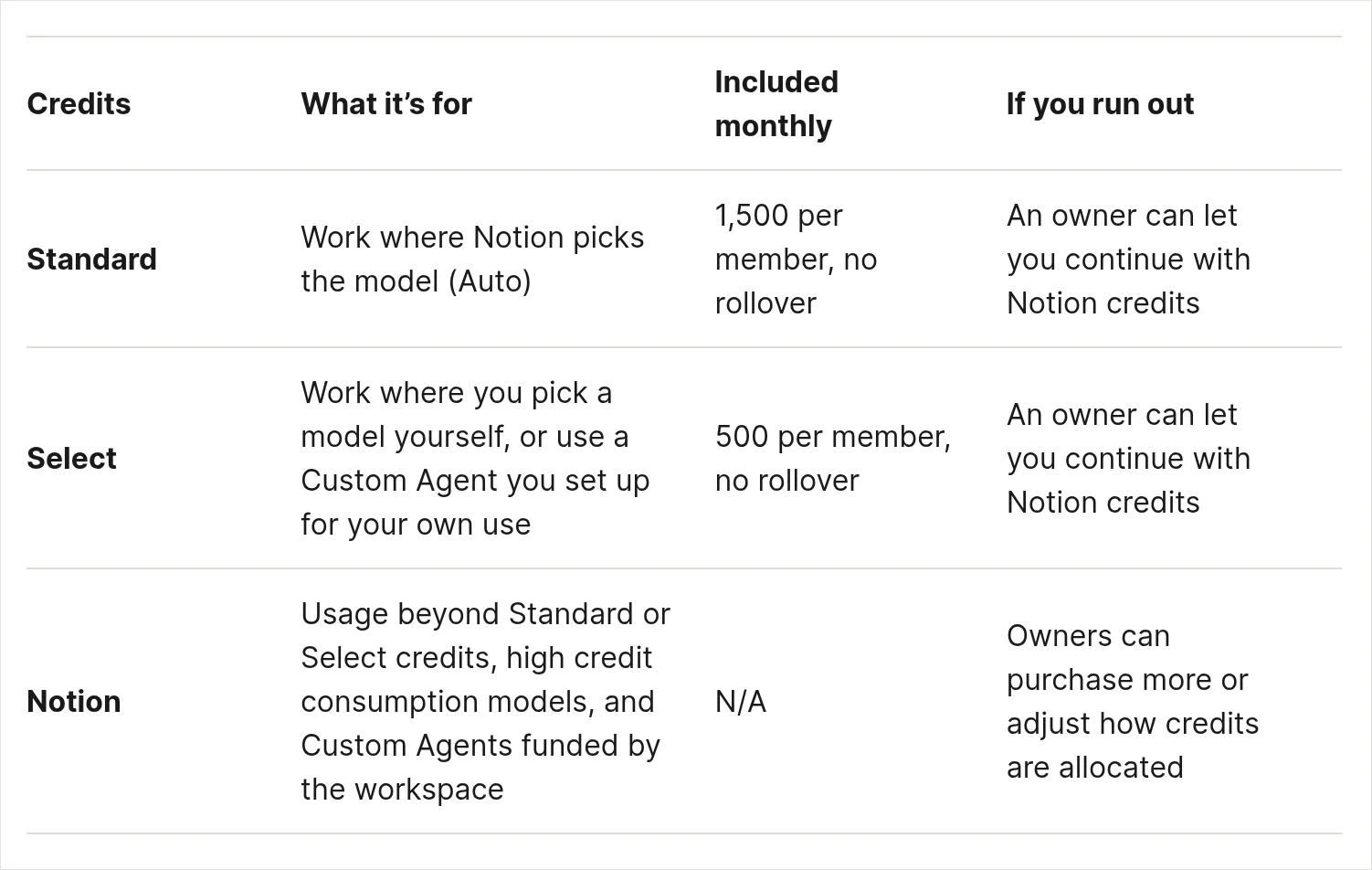 來源:Manage your AI credits,2026 年 11 月 13 日截圖。
左右滑動查看完整表格。
| 類型 | 用在哪裏 | 每月額度 |
|---|---|---|
| Standard | Auto、AI 編輯等 | 每人 1,500 |
| Select | 自選 model、個人 Custom Agent | 每人 500 |
| Notion credits | 額外用量、workspace 資助的 Agent | 另購 |
Standard 和 Select 分開計算,不能合併、互換或轉給其他成員。兩者在每月 billing cycle 開始時重設,未用完的額度不會累積。Select 用完而 Standard 尚有餘額時,可以把 Notion Agent 改回 Auto。額度及重設規則
個人設定、自行負擔用量的 Custom Agent,即使分享給團隊,仍使用自己的 Select;由 workspace 資助的 Custom Agent 則用 Notion credits。透過 Notion API 或 connected app 運行 Notion Agent 或 Custom Agent,也會使用 Notion credits。各類用量的分配
1,500 Standard credits 夠做多少件事?
按 Notion 的估算,每人每月 1,500 Standard credits 可做約 300 次簡單、150 次中等,或 60 次複雜 Auto 任務。以下每次任務的 credits 數字均來自 Notion 官方估算;各組算式是假設整份額度都用於該類工作。官方估算表
- 簡單工作,例如潤飾電郵、翻譯:1,500 ÷ 5 = 300 次。
- 中等工作,例如追蹤進度、寫工作報告:1,500 ÷ 10 = 150 次。
- 複雜工作,例如建立及設定 database、維護 CRM:1,500 ÷ 25 = 60 次。
12 月起,會議筆記會用多少?
AI Meeting Notes 使用 Auto,從 2026 年 12 月 1 日起消耗 Standard credits,一小時會議約用 10 credits。假設每月有 20 場一小時會議,計算如下:AI Meeting Notes 用量說明
- 20 × 10 = 200 Standard credits。
- 200 ÷ 1,500 × 100% ≈ 13% 的每月 Standard 額度。
- 1,500 − 200 = 1,300 Standard credits 剩餘。
- 1,300 ÷ 10 = 130 次中等 Auto 任務。
這樣看,會議數量可以先換算成固定的月度預算,再看餘額留給日常工作是否足夠。
自己選 model,500 Select credits 可以用多少次?
手動選 Opus 5.5,500 Select credits 約可完成 10 次簡單、5 次中等,或 3 次複雜任務。中等及複雜任務要向下取整,餘額不足以再完成一項相同估算用量的工作。官方 Auto 與 Opus 5.5 比較
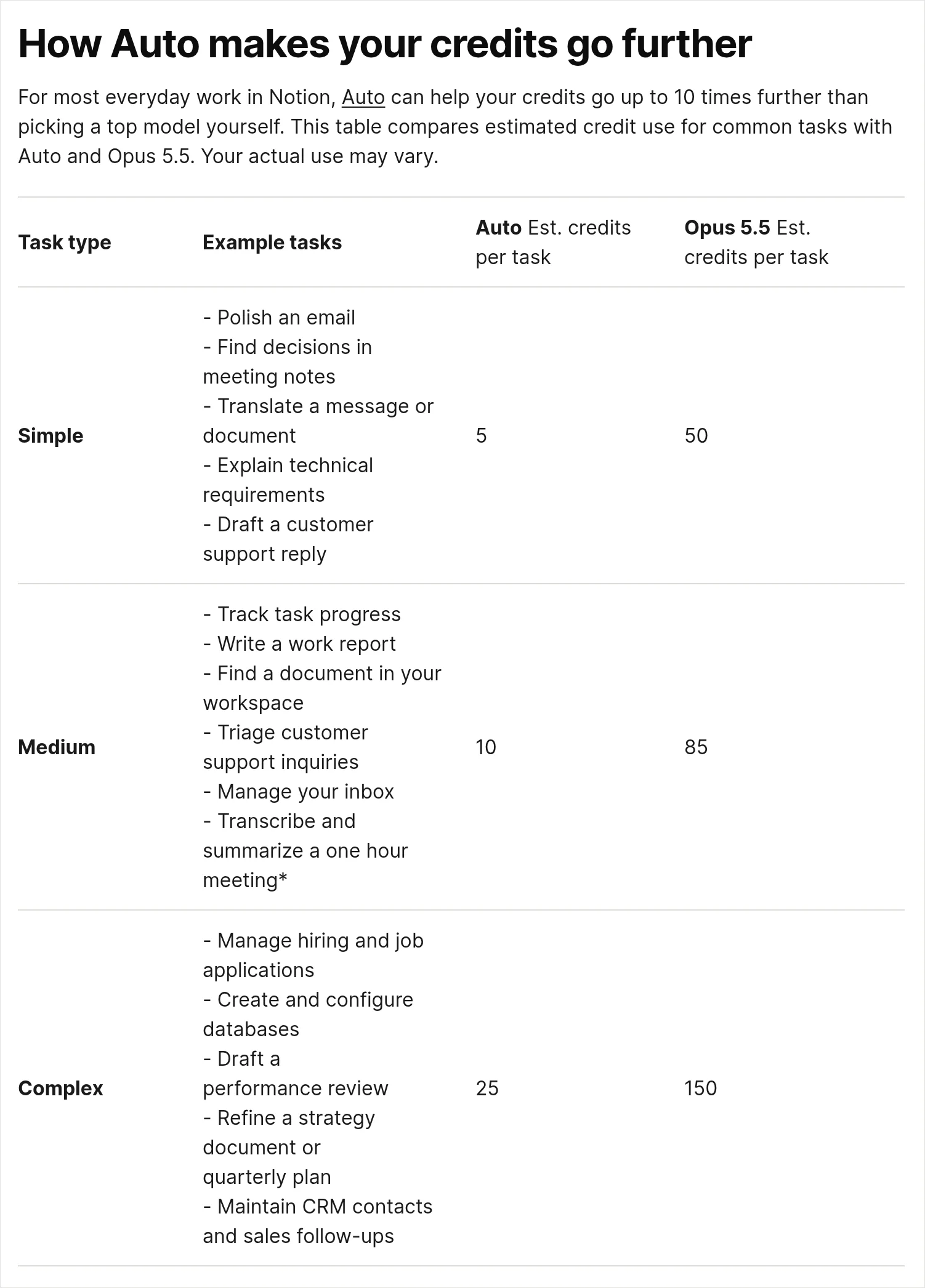 來源:Manage your AI credits,2026 年 11 月 13 日截圖。
- 簡單任務:500 ÷ 50 = 10 次。
- 中等任務:500 ÷ 85 ≈ 5.9 次,即 5 次完整任務。
- 複雜任務:500 ÷ 150 ≈ 3.3 次,即 3 次完整任務。
我改制初期手動選 Opus 5.5,一次工作用了約 70 credits。以那次用量計算,500 ÷ 70 ≈ 7.1,即每月大約 7 次同類工作。
同一類工作,兩種選擇的消耗比例也很清楚:簡單任務是 50 ÷ 5 = 10 倍,中等任務是 85 ÷ 10 = 8.5 倍,複雜任務是 150 ÷ 25 = 6 倍。這就是 Notion 所說 Auto 可令 credits 最多用得長約 10 倍的估算依據。官方估算
但我改制後最初幾天的體驗是,Auto 做不到我需要的有意義工作,所以我暫停使用 Auto 和 Notion AI,等有實質改善再考慮。對我來說,便宜的前提,是它完成的工作有用。
按習慣選最強 model
每次都手動選 Opus 5.5,日常工作也扣 Select。以我那次約 70 credits 的用量,500 Select 大約只夠做 7 次同類工作。
先決定工作用哪份額度
先分清楚哪些工作可交給 Auto、哪些值得手動選 model,哪些交給外部 AI。我目前把更多工作交給自己的 ChatGPT plan,或透過 Notion MCP 操作。
用完額度之後,要付多少錢?
Standard 或 Select 用完後,相關工作會暫停,直至額度重設;workspace owner 可設定 Notion credits 用量上限,容許繼續使用,這個安排預設關閉。Fable、Astra 等高消耗 model 只使用 Notion credits,不包含在 Standard 或 Select 內。官方規則
截至 2026 年 11 月,Notion credits 的官方定價是:
- 月度 credits:US$10 購買 1,000,每月收費及重設,未用完不累積。US$10 ÷ 1,000 = 每 credit US$0.01。
- 年度 credits:US$13 購買 1,000,預先付款,到續約時到期。US$13 ÷ 1,000 = 每 credit US$0.013。
月繳 plan 購買月度 credits,年繳 plan 購買年度 credits。兩者的有效期不同,計算費用時要先看自己購買的是哪一種。
如果我那次約 70 credits 的工作改由月度 Notion credits 支付,70 × US$0.01 = 約 US$0.70。同樣以月度 credits 支付一項估算 150 credits 的複雜 Opus 5.5 任務,150 × US$0.01 = 約 US$1.50。這是額外用量的換算;Standard 和 Select 本身沒有現金餘額。credits 類型說明
連接 ChatGPT plan 可以省下 credits 嗎?
可以讓指定 GPT model 的對話使用自己的 ChatGPT plan 用量。前提是你是 Business 或 Enterprise workspace 成員,並有 ChatGPT Plus、Pro、Business 或 Go;這項連接只適用於 Notion Agent,Custom Agents 和 guests 不適用。官方連接說明
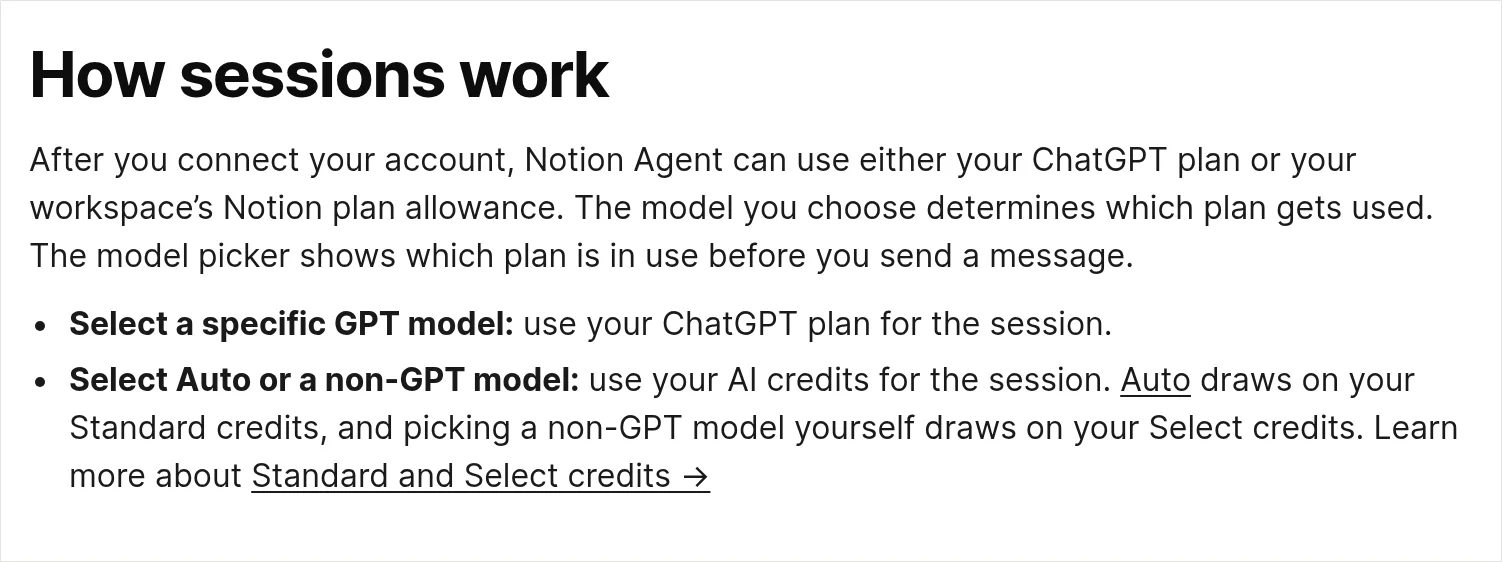 來源:Use your ChatGPT plan with Notion Agent,2026 年 11 月 13 日截圖。
在 Settings → Notion AI → Me → Connected subscriptions → Connect 連接後,選擇哪個 model,便決定用哪份用量:
- 選指定 GPT model:使用 ChatGPT plan。
- 選 Auto:使用 Standard credits。
- 手動選非 GPT model:使用 Select credits;Fable、Astra 等只用 Notion credits 的高消耗 model 除外。
發送前,model picker 會顯示正在使用哪個 plan。達到 ChatGPT 用量上限時,Notion Agent 會詢問是否轉用 workspace 的 Notion credits;ChatGPT 用量恢復後會切回。對話不會存入 ChatGPT history 或 memory。對話及用量規則
我已連接自己的 ChatGPT 付費計劃,分擔部分用量。對本來兩邊都有訂閱的我來說,在同一個 Notion 介面多了一個選擇,也是我暫時保留 Business 的原因之一。
團隊的 Notion AI 用量怎樣計?
每名成員有自己的 Standard 和 Select 額度,團隊總額不能當成共用餘額。即使同事幾乎沒有使用,重度用家也不能借用對方未用完的部分。成員額度規則
以 5 名 Business 成員為例:
- 5 × 1,500 = 7,500 Standard credits。
- 5 × 500 = 2,500 Select credits。
以上只是五人的合計,每人仍各自使用自己的 1,500 Standard 和 500 Select。若要由 workspace 支付額外用量,owner 要另行設定 Notion credits 安排。
我覺得公司團隊會有另一套考慮:誰可用哪些 model、誰可建立 agent、每人可花多少。Notion 預告的 AI Command Center 正朝這個管理方向走,但截至這次公告仍列為 coming soon。AI Command Center 預告
個人用家值得為 Notion AI 升級 Business 嗎?
如果只是為了 Notion AI 而訂閱 Business,以我現在的體驗,我會選 Plus,再用 Grok Bot 或其他 AI 經 Notion MCP 操作。Business 是否值得,多付的費用要連同你會用到的其他功能一起看。
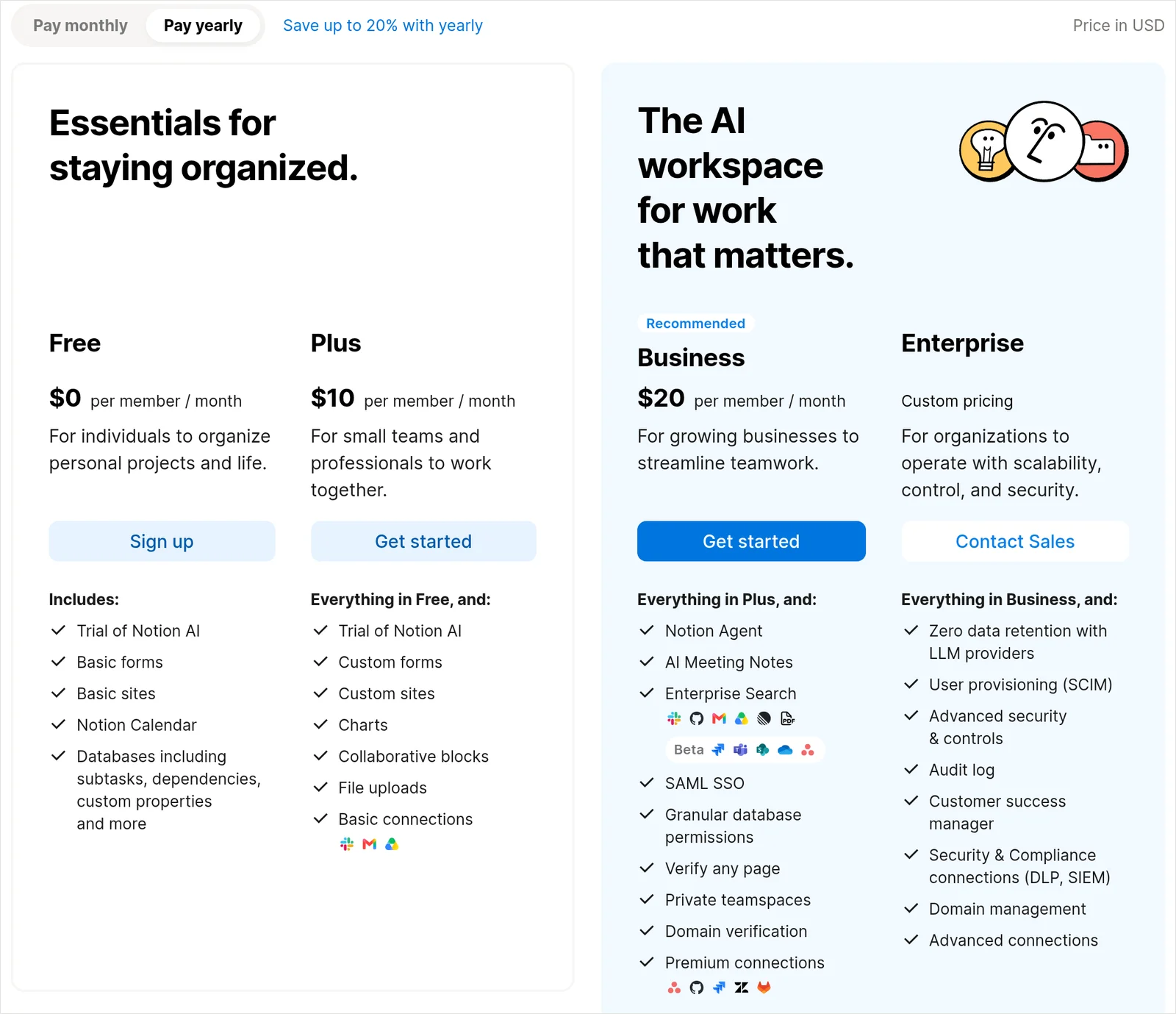 來源:Notion Pricing,2026 年 11 月 13 日截圖,畫面選取 Pay yearly。
截至 2026 年 11 月,官方定價按美元計算:
- 年繳:Plus 每人每月 US$10,Business US$20。20 − 10 = 每月多 US$10;10 × 12 = 每年多 US$120。
- 月繳:Plus 每人每月 US$12,Business US$24。24 − 12 = 每月多 US$12;12 × 12 = 一年多 US$144。
Plus 提供 Notion AI 試用;Business 包含 Notion Agent、AI Meeting Notes,以及每人每月 1,500 Standard 和 500 Select,亦符合連接 ChatGPT plan 的 workspace 條件。AI 額度及 ChatGPT plan 條件都有官方說明。
我自己暫時保留 Business,是因為 dashboard view、meeting notes、在 Notion 內使用自己的 ChatGPT plan,以及團隊合作。這幾項對我仍有用。
如果改用外部 AI,Notion 官方列明,經 Notion MCP 或 Notion API 進行日常讀寫,不消耗 Standard、Select 或 Notion credits,但仍有 rate limits。這與透過 API 運行 Notion Agent 或 Custom Agent 的收費不同。官方功能用量表
想了解這條路線,可以看 Notion MCP 操作指南。對我來說,Notion 最有價值的是讓資料、決定、進度留在固定位置,AI 可以更換,已累積的工作繼續留在同一張工作枱上。
小練習:看看這星期的工作會用哪份額度
先打開 Settings → Notion AI → Me,記下 Standard、Select 已用多少、剩下多少,以及重設日期。這裏就是官方提供的個人用量入口。查看用量的方法
再列出這星期最常做的三項 AI 工作,逐項選擇:交給 Auto、手動選 model,還是交給 Notion AI 以外的工具。若你選手動 model,就用上面的算式,看看 Select 能支持多少次同類工作。
常見問題(FAQ)
Notion AI credits 每月會重設嗎?
Standard 和 Select 在每月 billing cycle 開始時重設,未用完的額度不會累積。可在 Settings → Notion AI → Me 查看重設日期。官方說明
Standard 和 Select credits 可以互換嗎?
不能。兩份額度分開計算,也不能轉給其他成員。Select 用完而 Standard 還有餘額,可以把 Notion Agent 改回 Auto。官方說明
Notion credits 多少錢?
截至 2026 年 11 月,月度 credits 是每 1,000 個 US$10,按月重設;年度 credits 是每 1,000 個 US$13,預付並於續約時到期。這是 Business 和 Enterprise 可購買的額外用量。官方價格
Plus 方案可以用 Notion AI 嗎?
用 Notion MCP 會消耗 credits 嗎?
日常讀寫不消耗 credits,但仍受 rate limits 限制。透過 API 或 connected app 運行 Notion Agent 或 Custom Agent,則使用 Notion credits。日常讀寫規則及 Agent 用量規則
我現在更在意的,是工作完成後,資料和決定有沒有好好留下來。至於要不要再建立一個自動運行的 agent,我仍會先問自己:這件事真的需要定時或自動觸發嗎?